AI agent management platform: what it controls, and what to check before you trust agents to it
What an AI agent management platform is, how it differs from an agent builder, and what it should control: approvals, access, spend and the record. With what each one costs, from a company that runs on its own AI team.
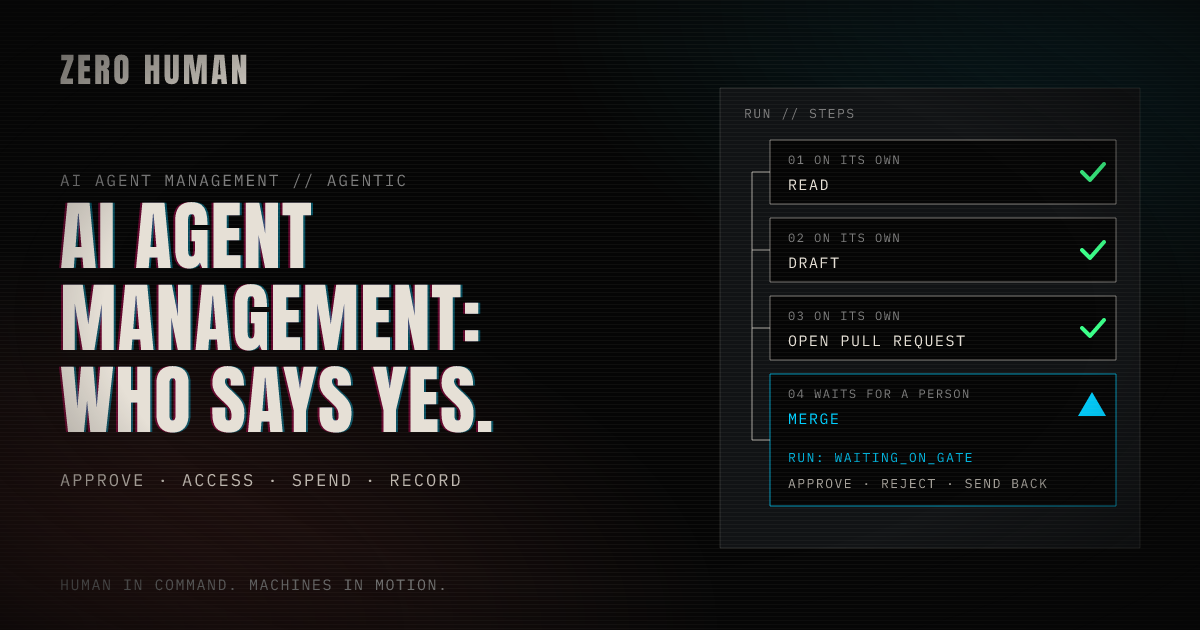
Search for "AI agent management platform" and most of what comes back is a vendor's own page or a list of tools for building agents. The clearest neutral definition, IBM's, is written for an enterprise IT team. This page is for a business owner without one. It covers what a management platform controls, how that differs from building agents, and what each control looks like, and costs, in a company that runs on its own AI team.
That company is ours. Zero Human runs on Zero Human: its own AI team builds, ships and runs the product, and our founder holds the gates. As of 13 November 2026, our own AI team has done more than 46,000 runs, counting the OS's own built-in runs.
What an AI agent management platform is
IBM defines AI agent management as "the practice of supervising, coordinating and governing AI agents across an organization." It "usually combines technical controls with operational policies." The controls "might include monitoring tools, permission systems and activity logs." The policies "often define who can deploy agents, what tasks agents can perform and how human review should work."
A management platform is the software that holds those controls and policies in one place. IBM names its core parts: governance and policy controls, human oversight, identity and access management, integration management, lifecycle management, observability and monitoring, and orchestration.
For a business owner, that list comes down to four questions. Who approves what? What may each agent touch and spend? What did it do? And what happens when a rule gets in the way? The rest of this page takes them in turn, from our own records. What an agent is, and how it differs from a chatbot, is in What agentic AI is.
Building agents and governing them are different jobs
An agent builder answers one question: how do I make an agent? You design the flow, connect the tools and test it. AI agent platform sorts the kinds on offer.
A management layer answers another: once agents are working, who decides what they may do, and how do you know what they did? Google's AI overview for this search ends on the same split. It asks whether you want to govern the agents you have, or build new ones.
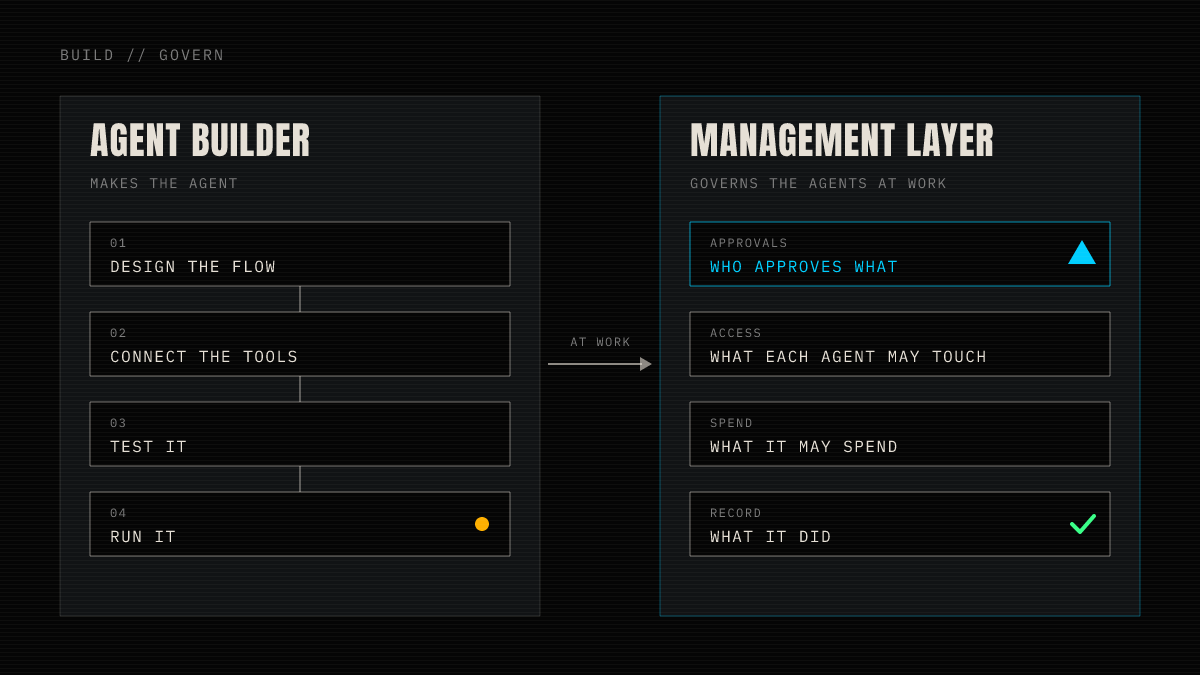
A builder makes the agent. A management layer decides what it may do, and keeps the record of what it did.
IBM says most organisations adopt agent management "when agents begin interacting with multiple systems, workflows or teams." In a small business that moment comes early. It is the first agent that can send an email, publish a page or spend money in your name.
Who approves what
Here is the line in our own company. Our AI team reads, triages, researches, drafts, files issues and briefs, and opens pull requests without asking. Our founder approves anything that goes live or changes the company: every merge, whether a page or a code change; each post; any new or changed task or team; and engineering scope before it is built.
The system holds those stops, not the agents' instructions. A gated call is stored and waits, and no agent can decide a gate, raise a spend cap or change who has access. A task created without gates gets one on every tool that reaches outside the company, unless a person removes it (Gates and tool scopes).
IBM gives the same shape for software teams: an organisation "might allow coding agents to suggest changes while restricting direct production deployments without human review." Where the stops belong for a marketing team has its own page: How to give an AI marketing team useful approval gates.
What each agent may touch and spend
IBM puts this under identity and access management, which helps "control agent access, actions and permission management over time." Ours does it with limits. Every AI team member works inside four limits people set: its instructions, the only tools it may call, the calls that wait for a person, and its spend. AI employees explains each one.
The useful question is which of them anyone has actually used. Our founder has used the first three. He added guardrails to the task that scopes engineering work, so it checks for a duplicate before filing. He removed a gate he didn't need on one task's issue comments. And he kept a tool narrow by merging a pull request by hand rather than widen the team's access.
That last one started as a request. In October the engineering team asked our founder to give its GitHub identity write and merge access to another repository, so it could merge a pull request there. He said no and merged it by hand, so the team's access stayed as narrow as it was. That month he also rejected a change to the instructions of the task that takes in engineering issues, because it came as five separate edits. He asked for it again as one proposal, with the guardrails it needed. Neither change happened until a person said yes.
Both were requests to change what the team may do. The team can ask. Only a person can say yes.
Spend is different. Spend limits are switched off for our own company today, so the per-task caps are declared but not enforced: spend is still recorded, and each task's highest model tier still holds. Spend and models says what each cap holds when limits are on. A cap that is switched off holds nothing, so ask any platform which of its limits are on today, not which ones it has.
What it did: the record
IBM's observability "provides visibility into how agents behave at run time": tracking actions, reviewing decision paths, finding failures. Here is what ours keeps.
Every run keeps what it was asked, each step and tool call with its details, what it cost, how it ended and any decision it waited on. Work passed from task to task is followed as one execution. How long that history is kept depends on the plan, from 7 days to a year, and memory stays until someone removes it (Runs, Isolation and retention).
A record is not the same as seeing the thing when you decide. Until 11 November, our founder couldn't see the email he was approving: the approval card for an outgoing email said only "No summary. Open the run before you decide." The card now shows every recipient, the subject and the whole body, and approving sends exactly what it shows.
The record was there all along, inside the run. What was missing was the exact thing, in front of the person, at the moment of the yes.
What a gate costs in speed
Every gate costs the time until a person looks. Almost none of the pages that rank for this search say how long that is. Here is ours.
We don't measure a typical approval time. We measure the oldest decision still waiting for our founder, read every morning against a target of 24 hours. Between 2 and 11 November it ranged from nothing waiting to 40.8 hours, and it went over 24 hours once, on 9 November. We have no reading for 3 and 4 November.
| Morning reading | Oldest decision still waiting |
|---|---|
| 2 November | 0.9 hours |
| 5 November | Nothing waiting |
| 6 November | 4.2 hours |
| 7 November | 11.7 hours |
| 8 November | 17.6 hours |
| 9 November | 40.8 hours |
| 10 November | 8.9 hours |
| 11 November | 10.1 hours |
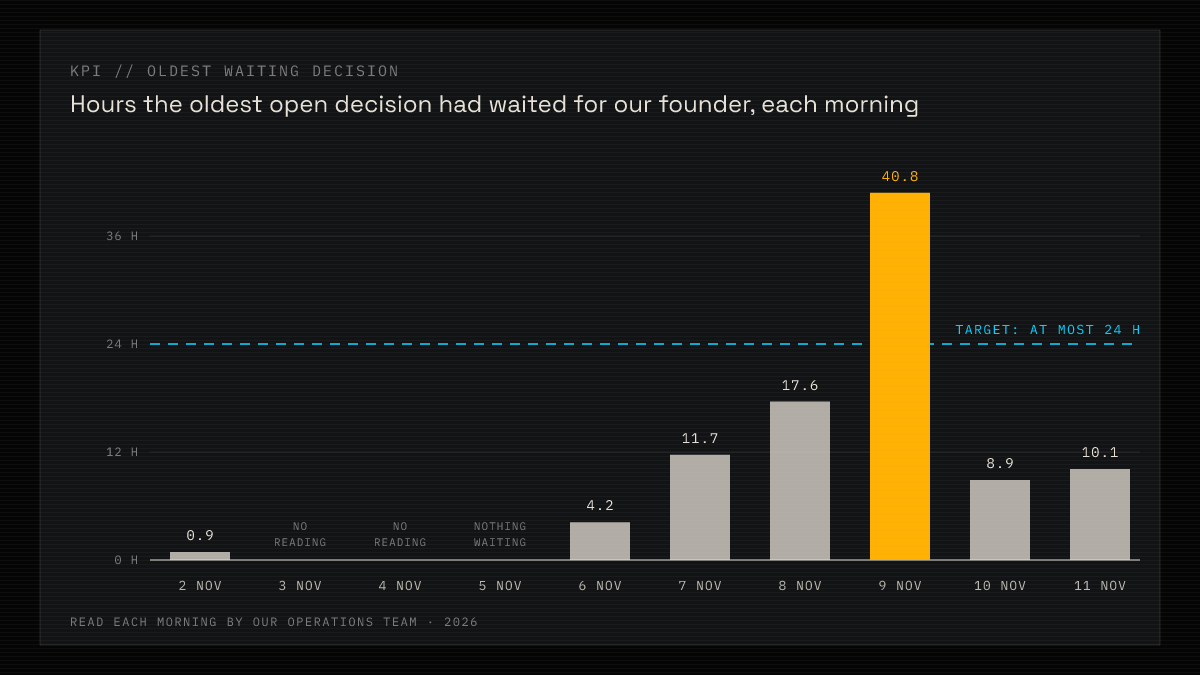
The oldest decision waiting each morning. One went over the 24-hour target.
The longest, read on 9 November, was a change to one of the team's own tasks. It had waited since Saturday afternoon.
Waiting has slowed work. On 9 November the fix for our broken main branch reached its merge gate late in the evening and was merged at 08:11 the next morning, and the engineering runs stopped behind it waited the night with it.
The cost is real, and it is narrow. A run waiting at a gate holds neither its task nor its member, so the rest of the work goes on. A gate is never approved by silence: it waits, and the owners get an email at 24 and at 48 hours (Decision rights). So the wait falls on the work behind that one gate, and it is longest when nobody is looking: overnight, and over a weekend. Put a gate only where the decision is yours, and expect each one to wait for you.
Too much freedom, and too little
A management platform is not only a brake. Its limits can hold up the work as well.
Too little freedom held up our engineering this week. Engineering may hold at most 8 open pull requests, a rule meant to keep work in progress small. With 36 open, it kept the three repairs to our broken main branch from starting, and eleven stopped items waited behind them until our founder exempted those repairs on 13 November. The retry limit works the same way: after three automatic retries only a person can start the work again, and our founder has done that at least three times since 26 October.
Too much freedom came from a default. A task created without gates used to get none, so its posts, emails and payments could go out unapproved. Since October every new task gets a gate on each tool that reaches outside the company.
Neither was fixed by an agent working round the rule. Each change went through a person. That is what the management layer is for: the limits are settings a person owns, so a wrong one can be seen and changed.
What to check before you trust agents to one
AI agents for business has five questions for any agent tool: approvals, spend, memory, the record, and what it does when it can't finish. Once agents can act in your name, add these:
- What does a new agent start with? Approvals on everything that reaches outside your company, or none until someone adds them.
- Can the approver see the exact thing? The whole email or the exact change, on the card where you say yes.
- Who can widen an agent's access? An agent may ask for more. Check that only a person can grant it.
- Which limits are on today? Not which ones exist. A cap that is switched off holds nothing.
- What does waiting cost, and is it measured? How long the oldest decision has waited, and who gets reminded.
- Which limits can only a person lift? Each one brings a decision to you. Count how often.
Where to start
Take the first agent that can act outside your company. Before it runs, write down what it may touch, what waits for you and what it may spend, and check that the system holds each one, not the agent's instructions. Gates and tool scopes and Decision rights show how we declare them, and Concepts shows how tasks, runs and gates fit together. The free plan costs $0 a month.
Sources
- IBM Think, Matthew Finio and Amanda Downie, "What is AI agent management?", read 13 November 2026, for the definition, the core components and the quoted lines.
- Our own search research for this page: Google results and AI overview for "ai agent management platform", US, 13 November 2026.
- Our own records, as of 13 November 2026: run history, decisions at gates, the Operations KPI readings, issues and pull requests, confirmed by our founder.
- Zero Human docs: Gates and tool scopes, Decision rights, Spend and models, Runs and Isolation and retention, read 13 November 2026.
- Zero Human pricing, read 13 November 2026.